
Layers & bindings
A keymap is a stack of layers, and each layer assigns a binding (an action) to every physical key. Layers share the same geometry and matrix — only the bindings differ.
Layers panel
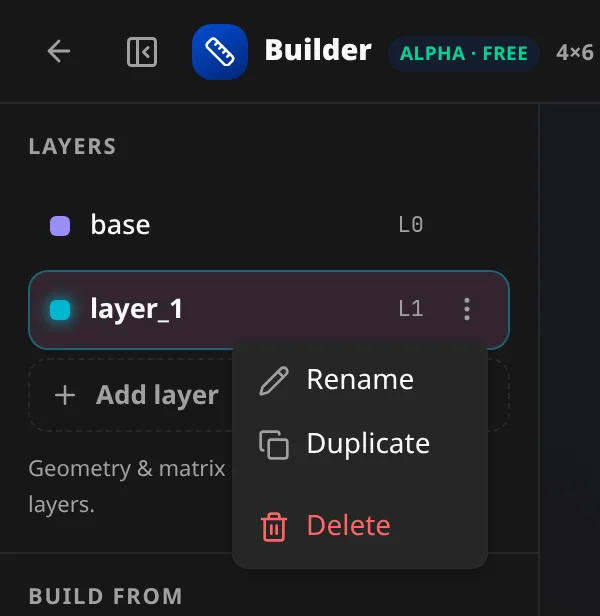
The Layers section lists every layer with its name and an L{index} badge.
- Click a layer to select it — the canvas then edits that layer's bindings.
- Add layer — appends a layer (
layer_1,layer_2…; bindings start transparent / pass-through — every key shows ▽). - Hover a layer to peek at it on the canvas without switching.
- The per-layer ⋮ menu has Rename, Duplicate, Delete (Delete is disabled when only one layer remains). Double-click a name to rename inline.
Layer order matters: a transparent binding falls through to the layer below, and bindings reference layers by name (a layer-tap targets "raise", not an index).
"layers": [
  { "name": "base",  "bindings": [ /* … */ ] },
  { "name": "lower", "bindings": [ /* … */ ] },
  { "name": "raise", "bindings": [ /* … */ ] }
]
The binding picker
Select a key and click Edit binding (or a slot in the inspector) to open the picker. It docks under the canvas:
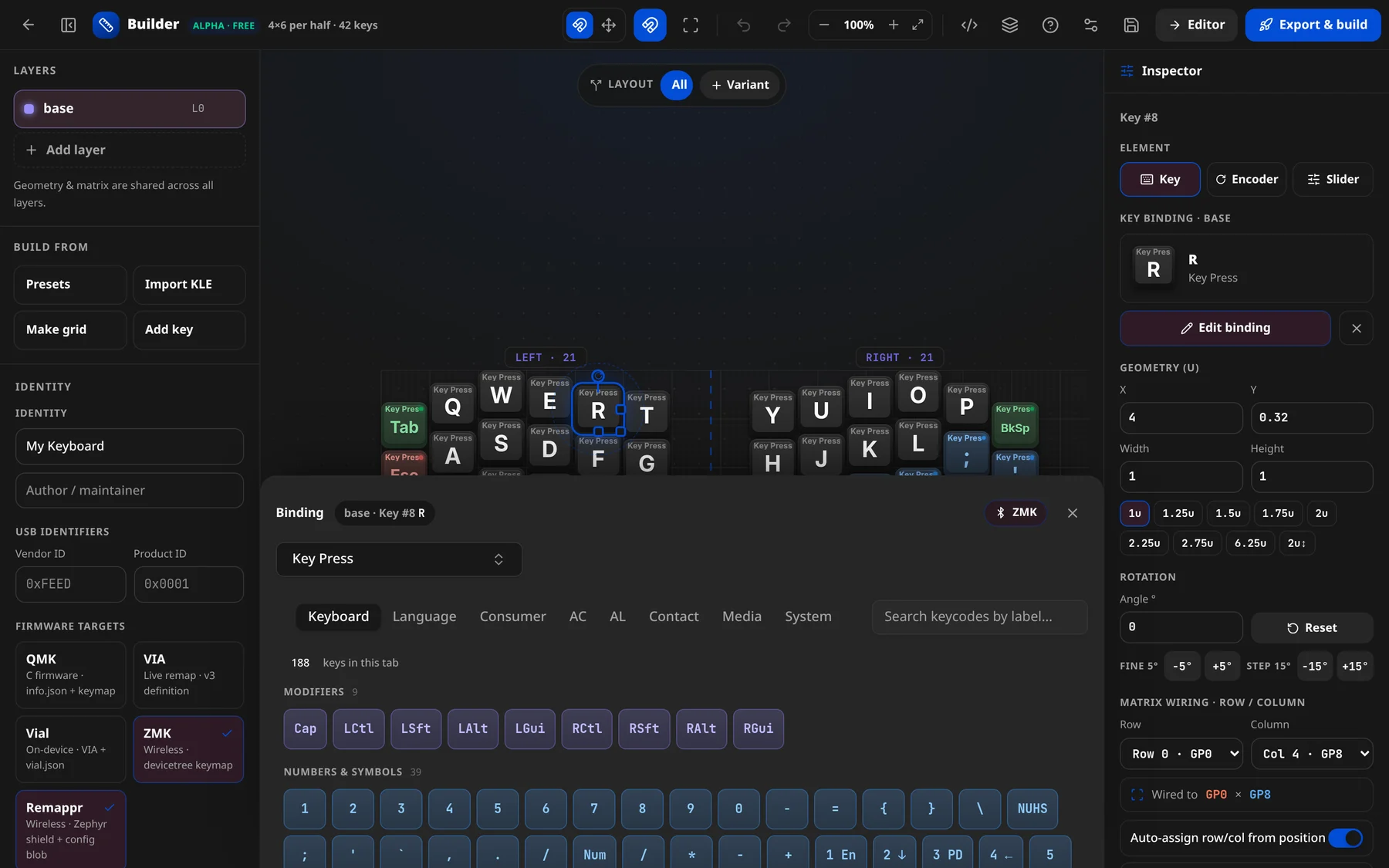
It works like the editor's binding editor: an action-type dropdown (Key Press, Mod-Tap, Layer-Tap…), parameter slots, then the keycode picker — tabs by usage page (Keyboard, Language, Consumer, AC, AL, Contact, Media, System), grouped keys and "Search keycodes by label…". Its header chip shows the context, e.g. base · Key #5 · A — layer, key index, slot, and current binding. A firmware chip (e.g. QMK + VIA, with a USB/Bluetooth icon) shows which targets the picker is offering actions for; Close picker dismisses it.
The picker is firmware-aware — it only offers actions the selected target(s) support and warns when one is unsupported.
Bindings, in the config
Each layer's bindings array has one action per key, in keyboard.keys order. You can write the friendly shorthand and the app expands it:
"bindings": [
  "Q", "W", "E", "R", "T",
  { "type": "mod_tap", "tap": "A", "mod": "LEFT_GUI" },
  "Ctrl+C",
  { "type": "layer_tap", "tap": "SPACE", "layer": "raise", "resolve": "prefer-hold" },
  { "type": "transparent" }
]| You assign… | Examples |
|---|---|
| A keycode | "Q", "SPACE", "Volume Up" |
| A modified key (combo string) | "Ctrl+C", "Ctrl+Shift+4" |
| Tap-hold presets | mod_tap (hold = modifier), layer_tap (hold = layer) |
| Layer switch | { "type": "layer", "mode": "momentary", "layer": "lower" } |
| Special | caps_word, sticky_key, transparent, none, output, lighting, mouse |
| References | macro, tap_dance, mod_morph, hold_tap (defined at the top level) |
The complete catalog — every action, its fields, and firmware support — is in the Actions reference.
Encoders & sliders
A key tagged Encoder carries cw / ccw / press bindings per layer; a Slider carries an analog value-map. You assign these from the inspector. In the config they live on the layer:
{
    "name": "base",
    "bindings": [
        /* … */
    ],
    "encoders": [{ "cw": "Volume Up", "ccw": "Volume Down" }]
}
It is all one config
Whatever you assign is written into the same JSON config the Edit JSON panel shows — so you can build visually and read the JSON back, or paste a whole layer of bindings and watch the canvas update.