
Identity & hardware
The Identity panel holds everything about the board that is not its layout or bindings — name, USB identity, firmware targets, controller, matrix, lighting and firmware config. These fields turn a keymap into a flashable project. Sections appear/disappear based on the firmware targets you select.
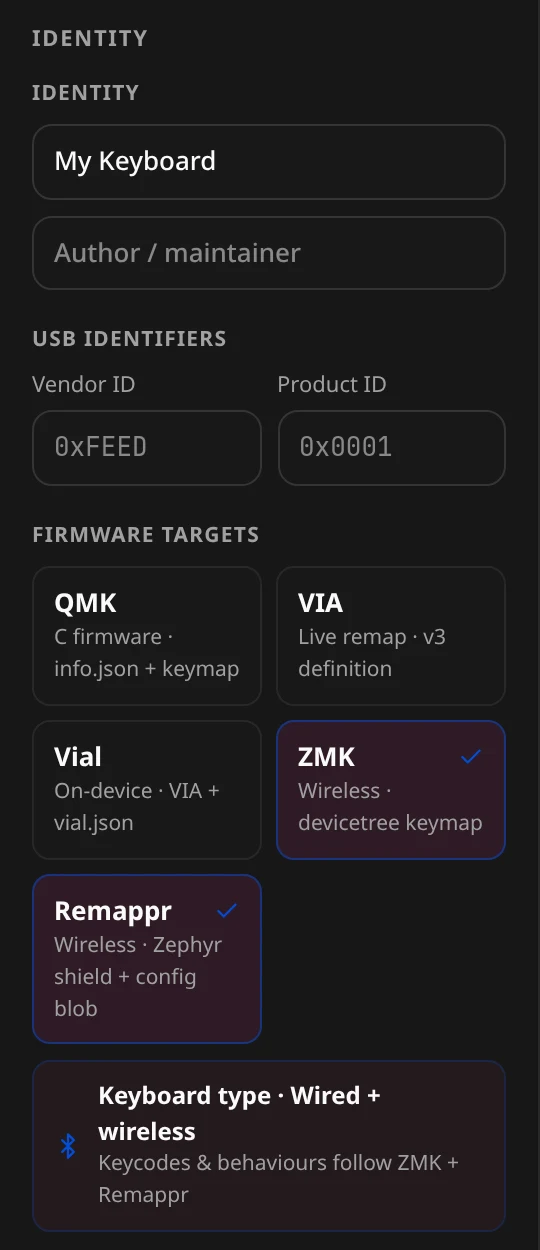
The panel scrolls, top to bottom: Identity · USB identifiers · Firmware targets · Controller · Matrix · Capabilities · Lighting · Firmware config · Hardware pins · Timing & defaults · Behaviors · Conditional layers · Readiness. Every field below is labelled exactly as it appears in the panel, with the config key it writes.
Identity
| Field | Writes | Notes |
|---|---|---|
| Keyboard name | meta.name | Display name; seeds the export project/shield name. |
| Author / maintainer | meta.author |
USB identifiers
| Field | Writes | Placeholder |
|---|---|---|
| Vendor ID | meta.vendorId | 0xFEED |
| Product ID | meta.productId | 0x0001 |
Required for the QMK family.
Firmware targets
One card per target; click to toggle, and several can be on at once. Selecting them fills keyboard.firmware[]:
| Target | Card blurb |
|---|---|
| QMK | C firmware · info.json + keymap |
| VIA | Live remap · v3 definition |
| Vial | On-device · VIA + vial.json |
| ZMK | Wireless · devicetree keymap |
| Remappr | Wireless · Zephyr shield + config blob |
An info line under the cards summarises the choice — "Keyboard type · Wired + wireless" (or wired / wireless only) and "Keycodes & behaviours follow ZMK + Remappr". VIA and Vial compile through QMK. See Firmware targets.
Controller
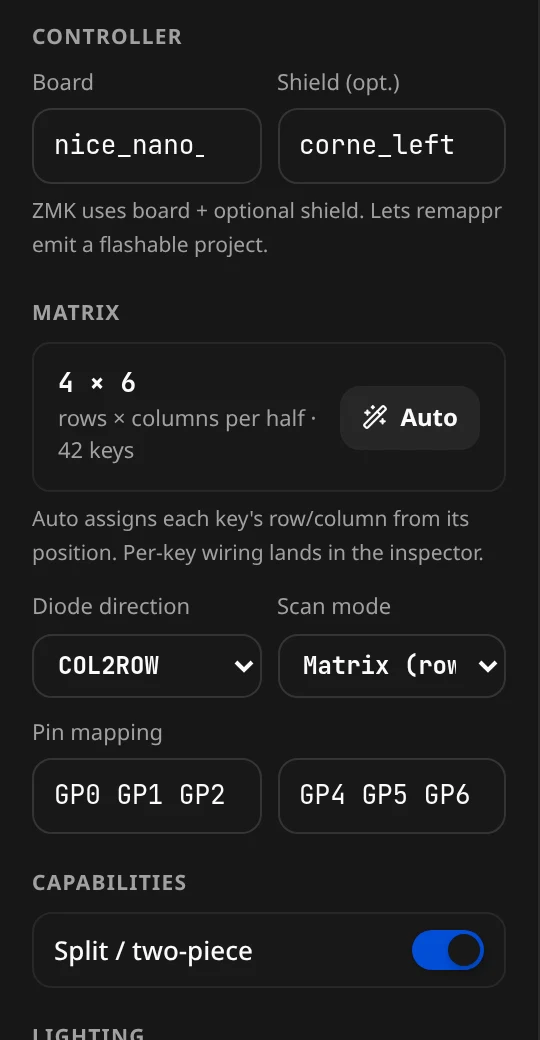
Writes keyboard.controller. Fields shown depend on the targets:
| Field | Writes | Placeholder | For |
|---|---|---|---|
| Board | controller.board | nice_nano_v2 | ZMK / QMK |
| Shield (opt.) | controller.shield | corne_left | ZMK |
| Processor (QMK) | controller.processor | atmega32u4 | QMK |
| Bootloader (QMK) | controller.bootloader | atmel-dfu | QMK |
| Dev board (QMK) | controller.developmentBoard | promicro | QMK |
| Device version | controller.deviceVersion | 1.0.0 | QMK |
"ZMK uses board + optional shield. QMK uses processor + bootloader (or a dev-board shortcut) + USB device version."
Matrix
The board-level matrix descriptor (keyboard.matrix) plus pin labels (keyboard.pins):
| Control | Writes | Options |
|---|---|---|
| Diode direction | matrix.diodeDirection | COL2ROW / ROW2COL |
| Scan mode | matrix.mode | Matrix (row × col) / Direct (1 GPIO/key) |
| Pin mapping | pins.rows / pins.cols | row pins / col pins |
| Auto | per-key matrix | "Auto assigns each key's row/column from its position." |
The display reads e.g. 4 × 6 · rows × columns per half · 42 keys (· wired when keys have matrix positions). Per-key wiring is in the inspector.
Capabilities
| Toggle | Writes |
|---|---|
| Split / two-piece | keyboard.split |
Lighting
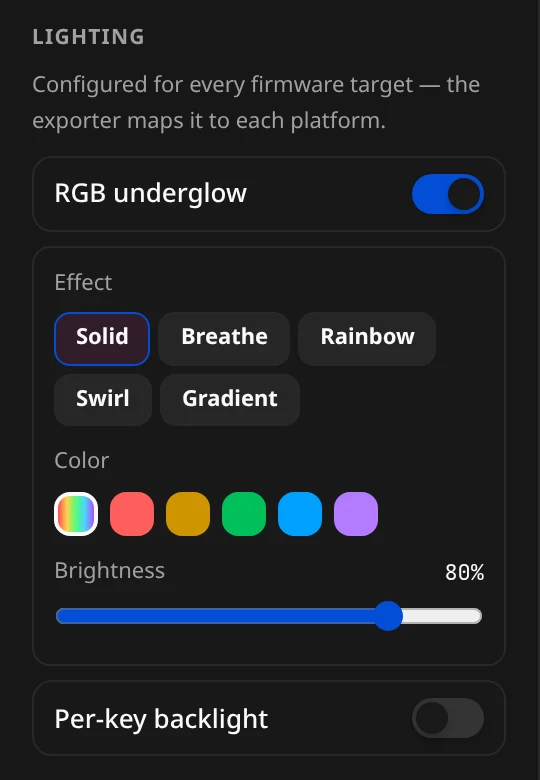
Writes keyboard.lighting; "Configured for every firmware target — the exporter maps it to each platform."
| Control | Writes |
|---|---|
| RGB underglow | lighting.underglow (on) |
| — Effect | underglow.effect — solid / breathe / rainbow / swirl / gradient |
| — Color | underglow.hue (or Rainbow) |
| — Brightness | underglow.brightness |
| Per-key backlight | lighting.backlight (on) |
| — Backlight brightness | backlight.brightness |
| — Breathing | backlight.breathing |
See Lighting for the full picture (actions vs config).
Firmware config (.conf) — ZMK
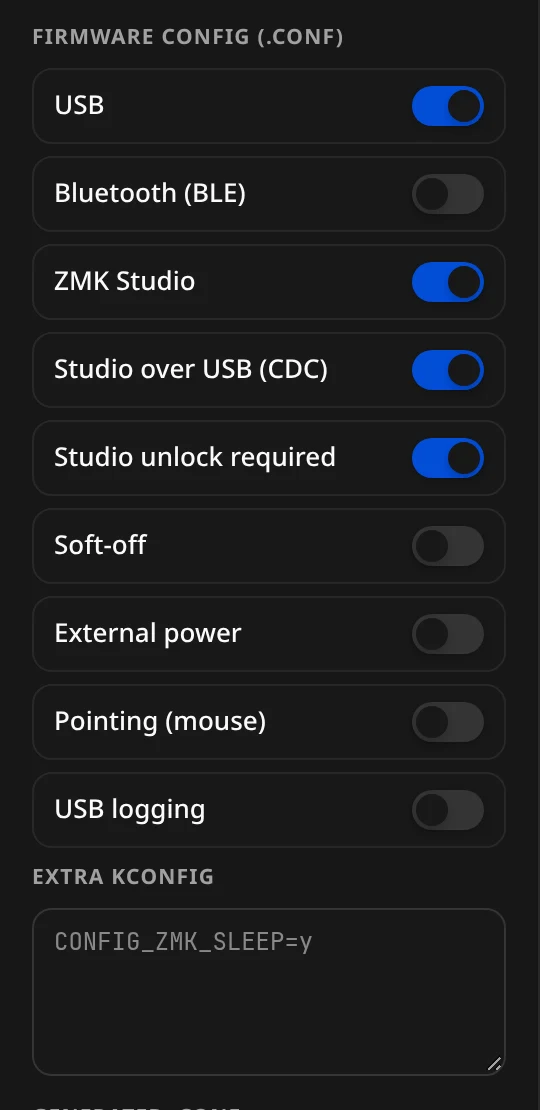
Toggles that derive the ZMK .conf, writing keyboard.firmwareConfig. A live Generated .conf preview updates as you flip them. Extra Kconfig (e.g. CONFIG_ZMK_SLEEP=y) is appended verbatim.
| Toggle | Derives |
|---|---|
| USB | CONFIG_ZMK_USB |
| Bluetooth (BLE) | CONFIG_ZMK_BLE |
| ZMK Studio | CONFIG_ZMK_STUDIO |
| Studio over USB (CDC) | Studio CDC block |
| Studio unlock required | CONFIG_ZMK_STUDIO_LOCKING |
| Soft-off | CONFIG_ZMK_PM_SOFT_OFF |
| External power | CONFIG_ZMK_EXT_POWER |
| Pointing (mouse) | CONFIG_ZMK_POINTING |
| USB logging | CONFIG_ZMK_USB_LOGGING |
Each is tri-state — left alone it auto-derives from used behaviors/hardware; toggling sets an explicit override. See Firmware config.
Hardware pins — ZMK
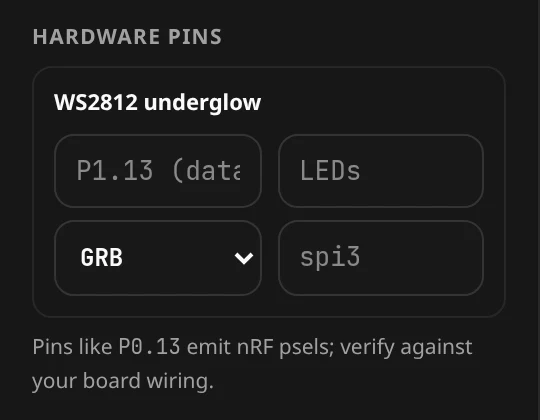
Appears when a feature needs a pin — here, after turning RGB underglow on. Friendly nRF labels like P0.13 emit psels; "verify against your board wiring." Writes keyboard.hardware.
| Section | Fields | Writes |
|---|---|---|
| Ext-power control GPIO | pin (P0.14), Active low | hardware.extPowerCtrl |
| Backlight PWM | pin (P0.13), instance (pwm0), Inverted | hardware.backlightPwm |
| WS2812 underglow | data pin (P1.13), LEDs, color order (GRB…), SPI (spi3) | hardware.ws2812 |
Timing & defaults
Board-wide behavior timings, written to the config's top-level defaults. Every field is optional: "Blank = the firmware / devicetree default."
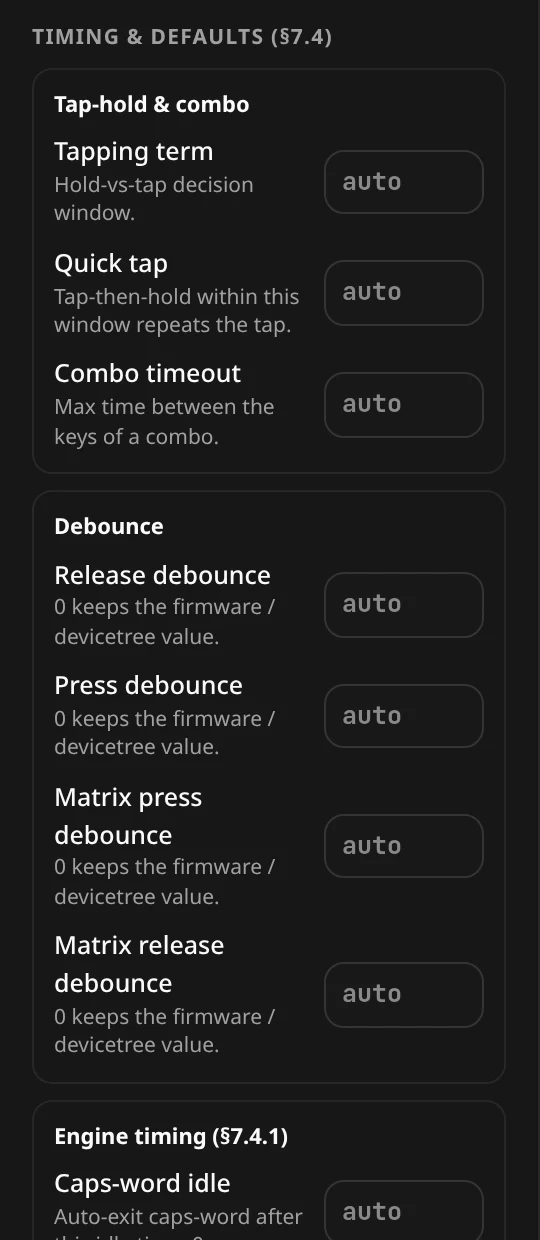
| Group | Field | Writes | Meaning |
|---|---|---|---|
| Tap-hold & combo | Tapping term | tappingTermMs | Hold-vs-tap decision window. |
| Quick tap | quickTapMs | Tap-then-hold within this window repeats the tap. | |
| Combo timeout | comboTimeoutMs | Max time between the keys of a combo. | |
| Debounce | Release debounce | releaseDebounceMs | 0 keeps the firmware / devicetree value. |
| Press debounce | pressDebounceMs | ″ | |
| Matrix press debounce | matrixPressDebounceMs | ″ | |
| Matrix release debounce | matrixReleaseDebounceMs | ″ | |
| Engine timing | Caps-word idle | capsWordIdleMs | Auto-exit caps-word after this idle time; 0 = never. |
| Sticky release | stickyReleaseDefaultMs | Sticky-key lifetime; 0 = until the next key. | |
| Macro default wait | macroDefaultWaitMs | Default gap between macro steps. | |
| Macro default tap | macroDefaultTapMs | Default tap hold-time inside a macro. | |
| Matrix poll period | matrixPollPeriodMs | Matrix scan interval; 0 keeps the devicetree value. |
The Engine timing fields apply on Remappr Firmware. The same fields are editable live on a connected board in the editor's Timing & Defaults dialog.
Behaviors (hold-taps & mod-morphs)
"Custom hold-tap and mod-morph defs the keymap can bind. Add one below, then tune its behaviors, timing and modifiers."
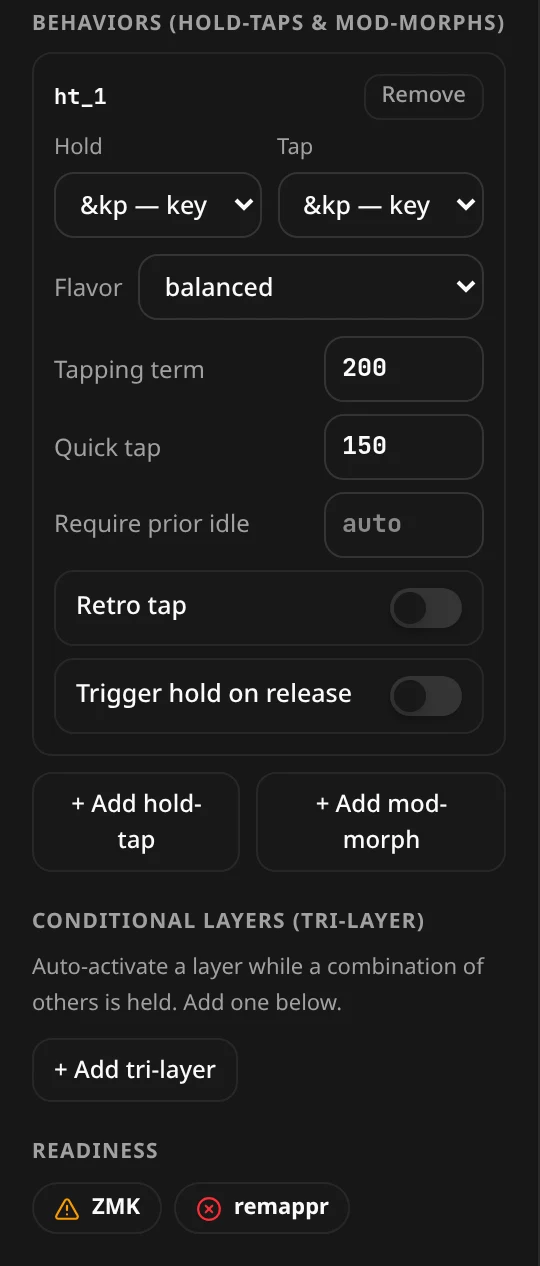
- + Add hold-tap — a new definition (
ht_1,ht_2…) inholdTaps: the Hold and Tap behaviors (&kp,&mo,<,&mt,&sk,&sl,&kt,&trans), Flavor (balanced, hold-preferred, tap-preferred, tap-unless-interrupted), Tapping term, Quick tap, Require prior idle, and the Retro tap / Trigger hold on release switches. Remove deletes it. - + Add mod-morph — a key that sends something else while a modifier is held, in
modMorphs.
Once defined, a hold-tap or mod-morph shows up in the binding picker as an action you can put on any key.
Conditional layers (tri-layer)
"Auto-activate a layer while a combination of others is held." + Add tri-layer adds a rule to conditionalLayers: pick the layers that must all be active and the layer they turn on — the classic lower + raise → adjust.
Firmware config (config.h / rules.mk) — QMK
For the QMK family: Extra config.h (#define TAPPING_TERM 180) and Extra rules.mk (MOUSEKEY_ENABLE = yes), each with a live Generated preview. Writes firmwareConfig.configH / firmwareConfig.rulesMk.
Vial security
Shown when Vial is a target. Writes keyboard.vial:
| Control | Writes |
|---|---|
| Keyboard UID (8 bytes) + Generate | vial.uid |
| Unlock combo (row,col …) + Add selected | vial.unlockKeys |
| Insecure (no unlock required) | vial.insecure |
"Vial ties a flashed board to its definition by UID and locks the keymap until the unlock keys are held. Select keys on the board, then 'Add selected'."
Layout options
Shown for VIA/Vial. Writes keyboard.layoutOptions; keys tag in via the inspector's Layout variant.
- Option label + Choices, comma-separated (blank = toggle) → Add option. "A blank choices field is an on/off toggle; two or more choices make a dropdown."
- Per-option Tag → {choice} and Untag selected tag the current selection.
Readiness
The Readiness strip at the bottom of the panel shows a chip per target — ✓ when it can build, ⚠ when it builds with warnings, ⊗ when something blocking is missing; hover a chip for the list. This is the same check the export modal runs.
A filled-in example
"meta": { "name": "My Split", "vendorId": "0xFEED", "productId": "0x0001", "target": null },
"keyboard": {
  "id": "my_split",
  "name": "My Split",
  "firmware": ["zmk"],
  "controller": { "board": "nice_nano_v2", "shield": "my_split_left" },
  "matrix": { "rows": 4, "cols": 6, "diodeDirection": "col2row", "mode": "matrix" },
  "split": true,
  "firmwareConfig": { "ble": true, "studio": true }
}