
Key inspector
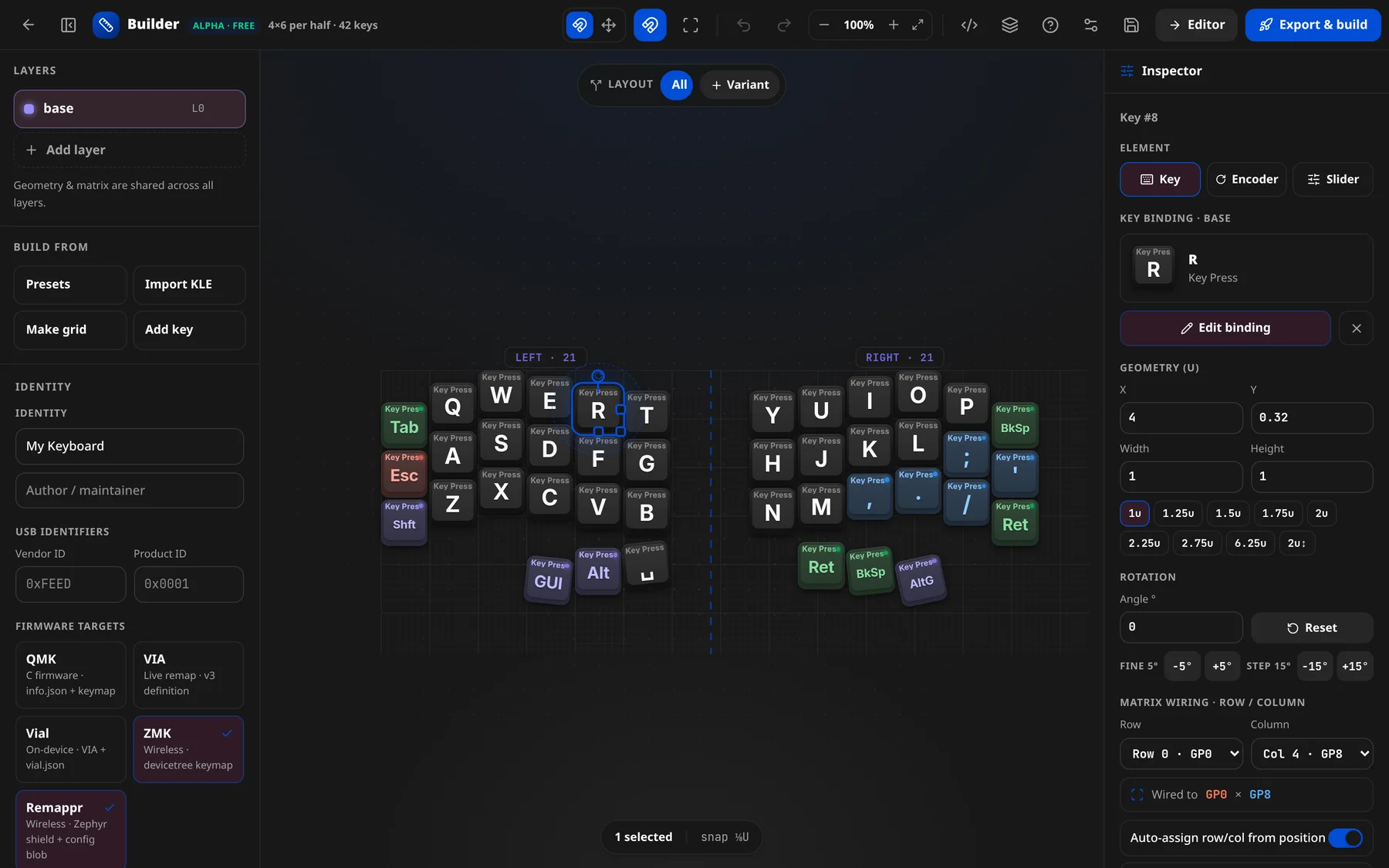
The right-hand inspector edits whatever is selected on the canvas. With one key selected it shows that key's element type, binding, geometry, rotation and matrix wiring; with several selected it shows bulk actions; with nothing selected it shows a hint.
Element type
A header reads Element with three tabs that set what the position is (keyboard.keys[i].element):
| Tab | Element | Adds |
|---|---|---|
| Key | a normal switch | a single binding per layer |
| Encoder | a rotary encoder | CW / CCW / press bindings |
| Slider | an analog slider | a value-map (volume / brightness / wheel) |
The label above shows Key #3 / Encoder #3 / Slider #3 (the index in keyboard.keys).
Binding
For a Key, the Key binding · {layer} section shows the current binding as a cap preview with Edit binding and Clear binding. Editing opens the binding picker.
For an Encoder, Encoder rotary · {layer} has three slots — Rotate ↻ (CW), Rotate ↺ (CCW), Press. For a Slider, Slider value-map · {layer} has a mapping dropdown (Volume / Brightness / Wheel / — No mapping —) plus Min (out) / Max (out).
TIP
"Analog input is exported as firmware guidance — the board-side ADC wiring is added in your overlay/keymap.c."
Geometry (U)
Fields X, Y, Width, Height, plus quick width presets (1u, 1.25u, 1.5u, 1.75u, 2u, 2.25u, 2.75u, 6.25u) and a 2u↕ height toggle. These map to x/y/w/h.
Rotation
Angle ° (→ r) with Reset, fine −5° / +5° and step −15° / +15° buttons. When a key is rotated, Pivot X / Pivot Y (→ rx/ry) appear.
Matrix wiring · row / column
Set the key's electrical position (→ matrix: [row, col]):
- Row / Column dropdowns (each option shows its pin, e.g.
Row 2 · GP6). - Status line: "Wired to {rowPin} × {colPin}" (e.g. Wired to GP0 × GP8).
- Auto-assign row/col from position — re-derives row/col whenever the key moves. "Editing row/column by hand turns it off."
- Snap to grid on row/col change.
Direct GPIO pin
A single direct-wired GPIO for this key (→ pin), labelled by element: Direct GPIO pin (optional) for a key, Encoder pin A (direct) for an encoder, ADC pin for a slider. Placeholder e.g. GP29. Export metadata for now.
Layout variant
When the board has layout variants, a Layout variant dropdown tags the key into one (→ variant); the default is Common (all variants).
Multi-select — bulk actions
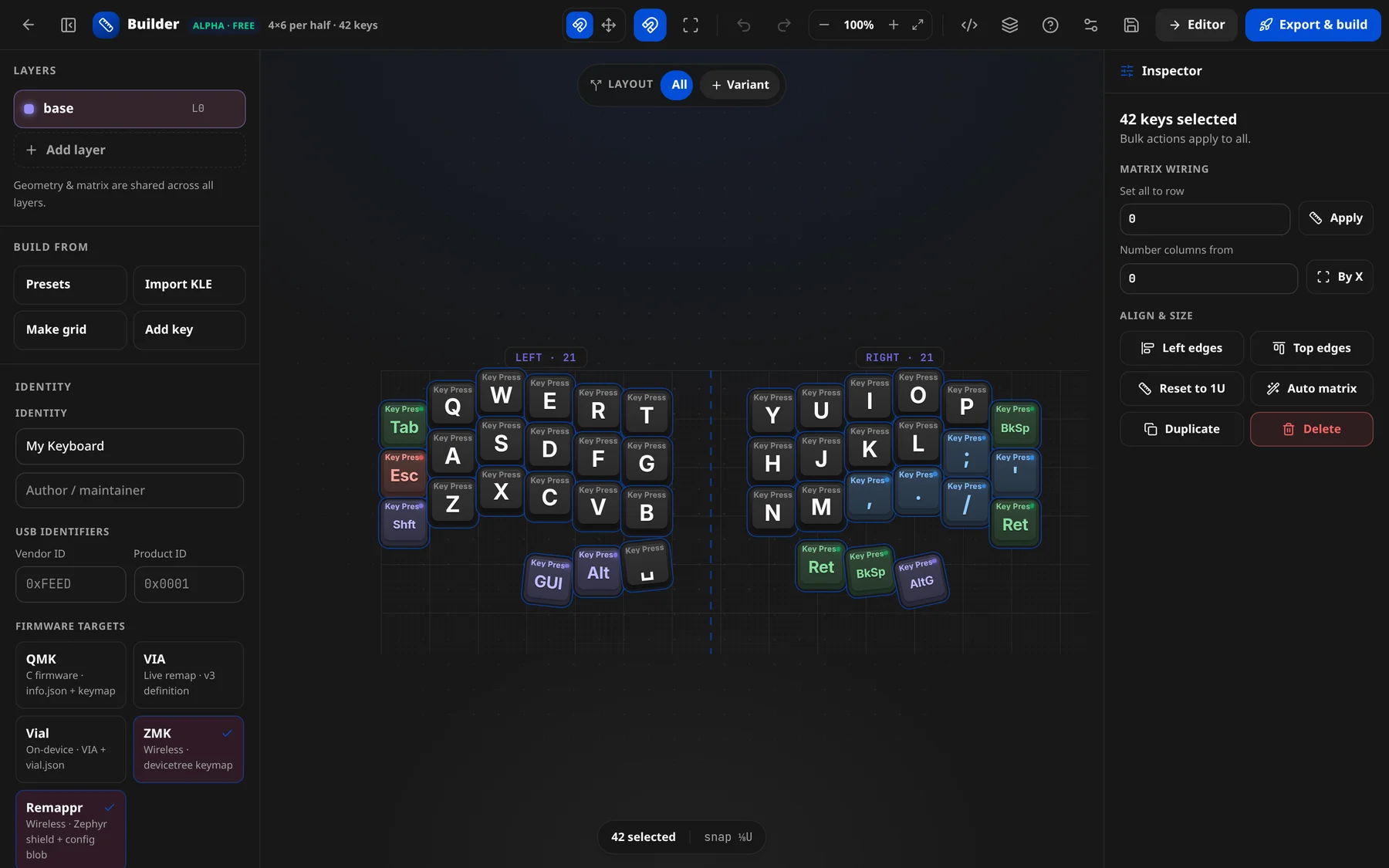
Select several keys (drag a marquee on empty canvas, or Ctrl/Cmd + A) and the inspector switches to {n} keys selected · Bulk actions apply to all:
| Group | Controls |
|---|---|
| Matrix wiring | Set all to row + Apply; Number columns from + By X |
| Align & size | Left edges, Top edges, Reset to 1U, Auto matrix, Duplicate, Delete |
Nothing selected
Shows "Nothing selected — click a key to edit its size, position & matrix. Drag on empty space to marquee-select."