Export & flash
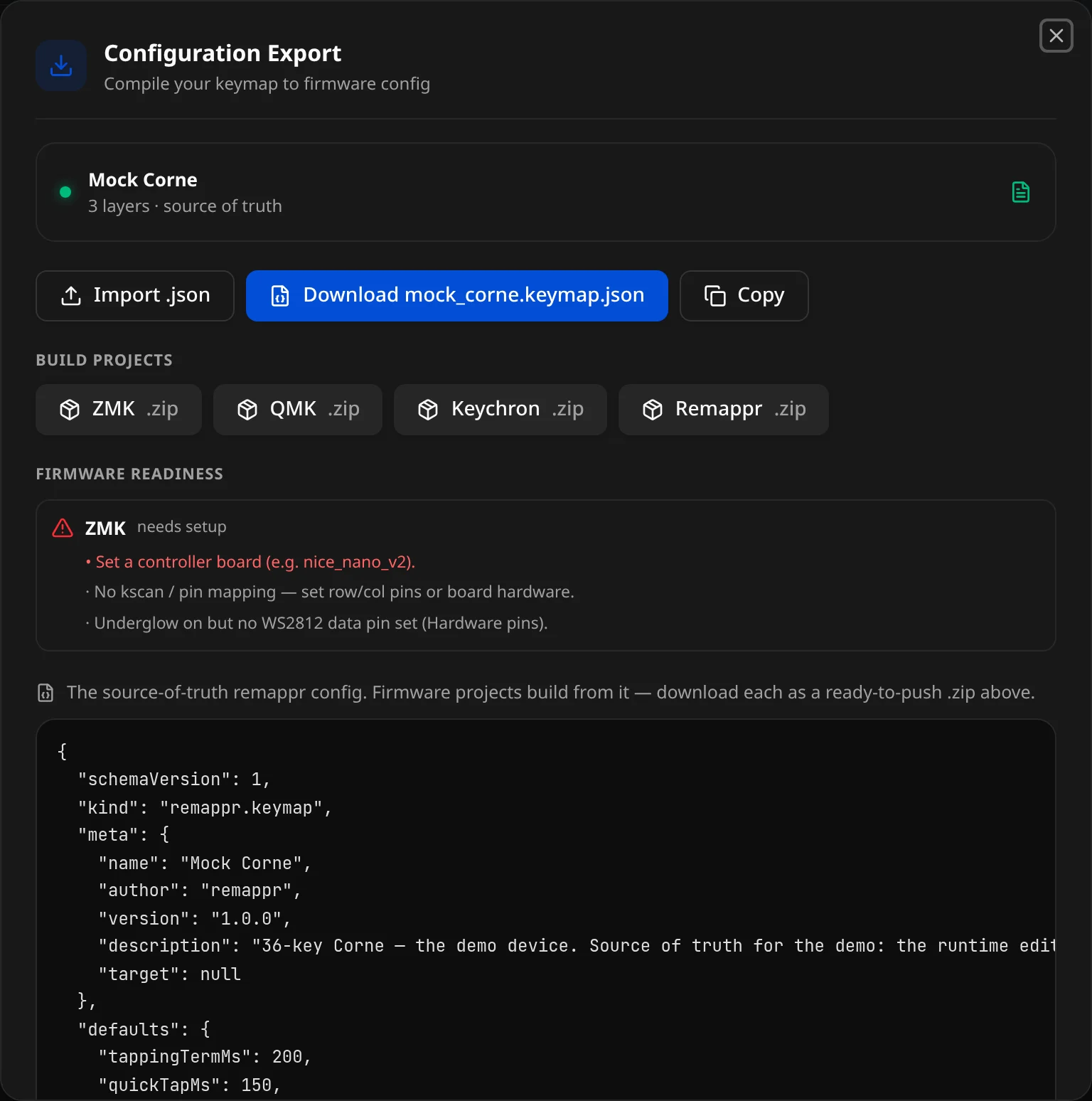
In the editor, the header's Flash & export config button (⤓) opens the Configuration Export modal — "Compile your keymap to firmware config." It is the same export surface the builder uses: the keymap as a Remappr config, ready-to-build firmware projects, and a check of what each firmware still needs.
The keyboard card
The top card names the keyboard and what is loaded:
{n} layer(s) · source of truth— a Remappr JSON config is loaded (a builder design, an imported file, or the demo).{FIRMWARE} device · native export— a connected device with no config.No config loaded · Connect a keyboard or import a .json config.
Import, download, copy
- Import .json — load a
.json/.txtRemappr config. Invalid files show an inline "Import: {error}". - Download name.keymap.json — the Remappr config: the source of truth every firmware project is built from.
- Copy — the same config to the clipboard.
With a connected device but no config, these become a native export instead: Download {FIRMWARE} config and Copy.
Build projects
One chip per firmware — ZMK, QMK, Keychron, Remappr — each downloads a ready-to-build project .zip: the firmware config, a GitHub Actions workflow, and a README. See per-firmware project bundles for what is inside each.
Firmware readiness
For each firmware, whether the config can be built as it stands — ready to build, or needs setup with the list of what is missing. For example, a keymap from a connected board has no hardware description yet, so ZMK asks for:
- a controller board (e.g.
nice_nano_v2); - the key scan / pin mapping (row and column pins, or a board definition);
- a data pin for the underglow, when underglow is on.
Fill those in the Builder (open it from the Start Page, or with Builder in the header when you came from there), then export again.
The config preview
At the bottom, the full Remappr config the downloads are built from — read it to check what will be exported.
Flash to your keyboard
- Download a firmware's project (.zip) from Build projects.
- Push the project to a new GitHub repository.
- GitHub Actions builds it automatically — or build locally per the README.
- Download the firmware artifact and flash it to your keyboard.
For the full build/flash walkthrough (cloud vs local, UF2 vs DFU), see Export, build & flash.